

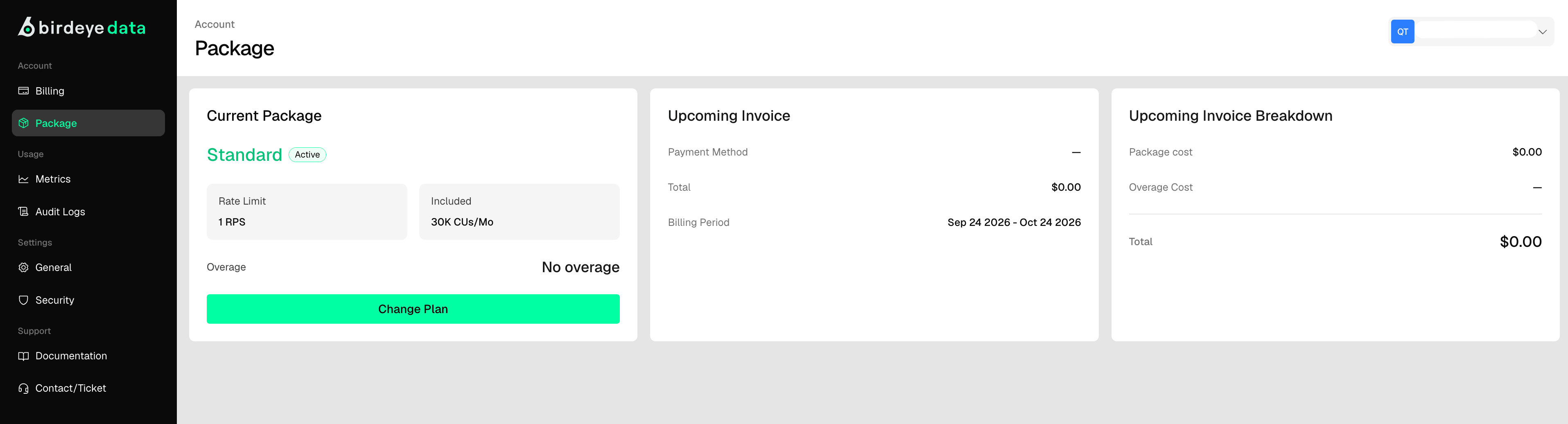
Current Package Panel
- Plan: Shows the name of your current plan (e.g., Standard).
- Status: Displays whether your package is active.
- API Usage Limit: Indicates the CU (Compute Unit) limit, such as 30K CUs.
- Change Option: Click the “Change” button to upgrade or downgrade your plan.
Upcoming Invoice Panel
- Payment Method: Shows the selected method for automatic payments.
- Total Due: Displays the amount to be paid for the upcoming billing period.
- Billing Period: Shows the time frame covered by the invoice (e.g., Jun 22, 2025 – Jul 22, 2025).
Upcoming Invoice Breakdown
- Package Cost: Displays the base cost of your subscription plan.
- Additional API Usages: If you exceed your CU quota, the extra charges will appear here.
- Total: Sum of all charges (currently $0.00 in your example).
Best Practices
- Monitor CU usage to avoid additional charges.
- Update payment methods regularly to prevent service disruption.
- Change packages based on your usage needs (scale up/down).
- Download invoices regularly for accounting or internal audit.